


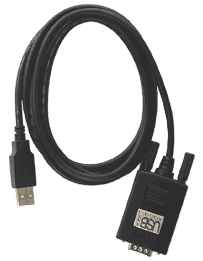
The USB to Serial Converter (MI069) allows you to use all Pico Technology serial devices such as the TC-08, ADC-16, EnviroMon and other serial devices through the USB port on your PC. Installation is simple. Plug your serial device into the Converter. Plug the converter into your computer. Insert the disk. With USB technology, there are no IRQ conflicts and no COM Port conflicts.
Most computers currently have serial, parallel and USB on their PC. The USB to serial converter allows multiple products to be used on the same PC without plugging in cards and also gets around the problem of adding more serial ports into laptops.
- Free up your existing serial port or use serial devices on a PC without available serial ports
- Avoid IRQ and COM port conflicts
- No need to install an add-in card or open the computer
- Supports up to 115kb/sec
- LED light indicates power and data transfer
- Bus Powered —no need for a cumbersome power supply
- 100% USB compliant. Guaranteed.
- The future is built in with field upgradable ROMs
Package Contents
- USB to Serial converter
- CD-ROM with USB to Serial Drivers
- Easy installation guide
System Requirements
- Windows 98, 2000, ME or XP
- Available USB port
Frequently Asked Questions (faq)
Q: Does this converter require an IRQ?
A: No, the USB controller on the motherboard is the only item that requires an IRQ. If you enable DOS box compatibility, then it will pull an IRQ.
Q: How do I plug a 9-pin into the 25-pin serial connector ?
A: Pico Technology supplies a 25 to 9 pin converter with each serial port product.
Q: My serial device will not respond, what do I do?
A: Verify that the serial device is using the USB Comm Port.
Q: What drivers do I need for my PC?
A: Drivers are supplied on the floppy disk, included with the USB adaptor.
Q: Why would I want to purchase this converter ?
A: It frees up your serial port for other devices such as Palm Pilots, and other Pico products. It is hot pluggable with other serial peripherals and it does not require an IRQ.


