Why USB?
The Universal Serial Bus (USB) has become the standard method for interfacing peripherals to PCs. Today virtually all PCs, including laptops and notebooks, are fully USB-ready and include at least one USB port.
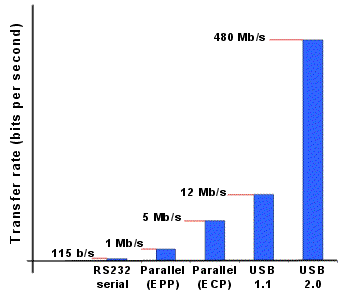
The PicoScope 3000 series uses the latest, and fastest, USB standard — USB 2.0 (Hi-Speed USB). Unlike many PC oscilloscopes that are only “usb 2.0 compatible”, and only offer USB1.1 performance, the PicoScope 3000 series are true USB 2.0 oscilloscopes. This allows PicoScope 3000 USB oscilloscopes to take advantage of the fast data transfer rate that ensures a quick screen update rate, even when collecting large amounts of data.
USB 2.0 is backward compatible with USB 1.1 allowing PicoScope 3000 USB oscilloscopes to be used on older PCs with USB 1.1 ports. Although the data transfer rate will be slower when using USB 1.1, it is still faster than a parallel port connection.
| Easy to setup and use
Connecting and using a PicoScope 3000 series USB oscilloscope could not be easier. Simply connect the oscilloscope to the PC using a standard USB cable (supplied). The host PC will automatically detect the PicoScope avoiding the need for any complex setup procedures, and without the need to reboot the PC.
In normal operation the PicoScope can be powered directly by the USB bus, eliminating the need for an external power supply, and making the PicoScope 3000 series ideal for use both in the lab and in the field.
|
 |
|
|
The ultimate USB oscilloscope
With high bandwidths, fast sampling rates, large buffer memories and lightning-fast data transfer the PicoScope 3000 range of PC oscilloscopes are ideal replacements to traditional benchtop oscilloscopes.
|
The benefits of USB
| Easy to use |
All USB peripherals are detected by the PC automatically and can be connected and reconnected without the need for rebooting the PC. |
| Fast |
Transfer rates many times faster than USB 1.1 or paralle port devices |
| Expandable |
Upto 127 peripherals can be plugged into one host computer |
| Portable |
Devices can be powered directly from the USB bus
— wherever your PC goes, your USB peripherals can go too |
| Compatibility |
USB 2.0 is backward compatible with USB 1.1. |
|