 |
 |
|
Takeoff Software
|
BidPoint XL
Version 7 now available. Download Demo

|
| |
BidPoint XL, is an Excel add-in program, digitizes directly into Microsoft Excel. That makes fast takeoffs even easier. No need to flip-flop back and forth between Excel and a separate digitizing application. Simply click on a spreadsheet cell and electronically measure and draw items from paper plans in seconds.
The digitized quantities and drawings are saved with the Excel cell and file. BidPoint XL is so user friendly that most estimators are up and running in less than fifteen minutes.
More.....
|
BidScreen XL
Version 8 Now Available. Download Demo
|
|
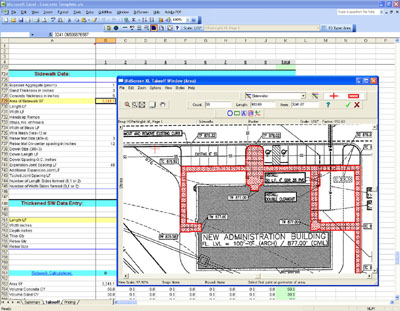
BidScreen XL gives you the power to takeoff your electronic plans directly in Microsoft Excel. Electronic plan files supported include pdf, tif, bmp, jpg, dwg, dxf and others. With BidScreen XL, you can zoom and pan the image while you're working in Excel.
Takeoffs are a snap, just click on a spreadsheet cell and electronically measure and identify areas, lengths and counts from your electronic drawing files with your mouse. The measurements and digitized takeoff drawings are saved with the Excel workbook and can be edited and printed. And, you can apply colors, count symbols, line styles and area fill patterns to your drawings.
Sample estimating Excel template files for general contractors, concrete, roofing, painting and other subtrades are also included.
BidScreen XL is simple, efficient and no additional hardware is needed. So, go electronic and make your takeoffs easy. Call today and see how BidScreen XL and ePlans work for you.
More......
|
SiteWorx OS

|
|
Siteworx OS works with PDF, Layered/Vector PDF, TIFF, JPEG, BMP, DWG, DXF and many other raster and vector CAD files. Quickly enter project boundaries, contour lines, point elevations, areas, boring logs, trenches and topsoil strip and respread areas. Once information is recorded, SiteWorx/OS automatically creates 3D models and accurately calculates cut, fill volumes and areas with subgrade volumes. more.....
|
SiteWorks
Version 5 Now Available
|
|
Siteworx Digitizer Version
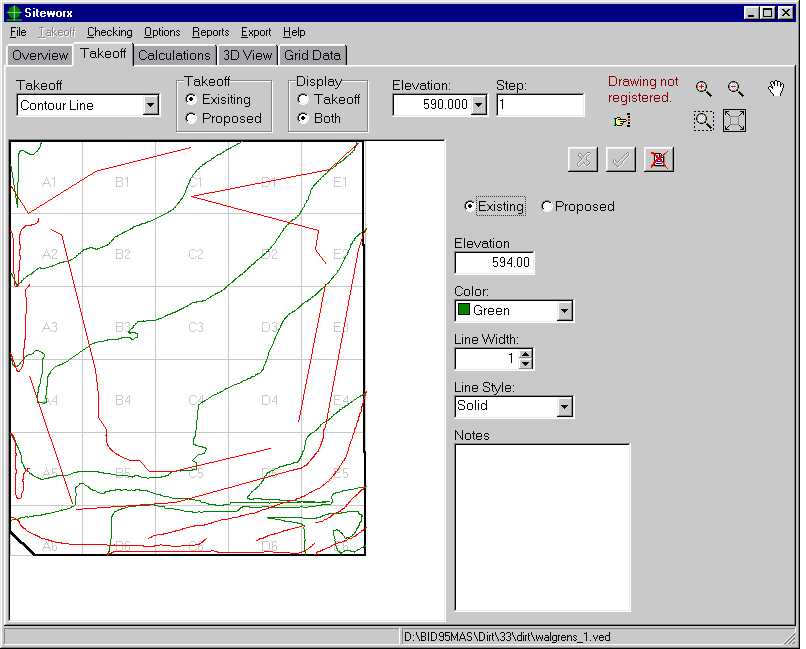
When calculating cuts and fills, SiteWorx saves you time to do more important things. Like more jobs. Now working with “topos” is simple. With SiteWorx you’ll digitize into the computer existing and proposed contour lines, spot elevations and areas along with project boundaries, topsoil strip areas and topsoil respread areas. Once you have electronically digitized the blueprint into SiteWorx, click the mouse and cut and fill volumes are automatically and accurately calculated. Areas are also calculated with sub grade volumes. SiteWorx even tells you how to adjust proposed elevations to arrive at a balanced site.
More....
|
|
|
|
|
|


